10 Oct

Lubuntu 24.10 (Oracular Oriole) Released!

Wake up and hear the birds sing! Thanks to the hard work from our contributors, Lubuntu 24.10 has been released. With the codename Oracular Oriole, Lubuntu 24.10 is the 27th release of Lubuntu, the 13th release of Lubuntu with LXQt as the default desktop environment.

Download and Support Lifespan

With Lubuntu 24.10 being an interim release, it will follow the standard non-LTS support period of nine months; this means that Lubuntu 24.10 will be supported until July 2025. Our development focus going forward will be on Lubuntu 25.04 and future releases, so only critical bugfixes and security updates will be provided.
If you choose to use Lubuntu 24.10, we STRONGLY recommend upgrading to 25.04 soon after it is released, but before Lubuntu 24.10 hits end of life. The Lubuntu Update application will assist you in upgrading your system when it becomes necessary.

Installation

You can download Lubuntu 24.10 here. If you would like to upgrade your existing 24.04 installation, please visit our manual page describing the process. Common Ubuntu instructions can be found here.

New in Lubuntu 24.10

LXQt 2.0 and Qt 6

Lubuntu 24.10 is the first release of Lubuntu to ship with a primarily Qt 6-based environment. Previous LXQt releases used Qt 5. Due to this upgrade, modern Qt 6-based apps such as the latest versions of VirtualBox, qBitTorrent, and more will now be themed similar to the rest of the desktop. Qt 5 app theming also still works, allowing you to continue to use apps that haven’t caught up with Qt 6 yet.
Lubuntu-specific applications (namely Lubuntu Update and the Lubuntu Installer Prompt) have also been updated to use Qt 6. The Calamares installer continues to use Qt 5 however. We expect to switch Calamares to using Qt 6 for Lubuntu 25.04

Kvantum Theming

For a while now, Lubuntu has been using the Breeze theme from KDE Plasma. While this has worked well enough for a while, it has had some incompatibilities with LXQt crop up before, and this cycle it happened again. Rather than continuing to make a KDE component work where it wasn’t really designed to, Lubuntu 24.10 now ships with Kvantum theming. Kvantum’s lead developer is also one of the primary developers of LXQt, so we expect no major incompatibilities going forward.
Our new theme, aptly named “Lubuntu”, is based upon Kvantum’s KvArc theme and is modified to look more similar to Lubuntu’s prior theming.

What happened to Wayland?

Readers who have kept up with our blog probably remember that we wanted to offer Wayland as an option in 24.04 and switch over to using Wayland by default in 24.10. Sadly this did not go according to plan. LXQt 1.4 and LXQt 2.0 both turned out to be too painful to use in a Wayland environment for us to be comfortable shipping Wayland by default, and we did not have time to implement them as an option. LXQt 2.1 is expected to ship with full Wayland support, so we will be trying to make Wayland happen for Lubuntu 25.04.

Artwork

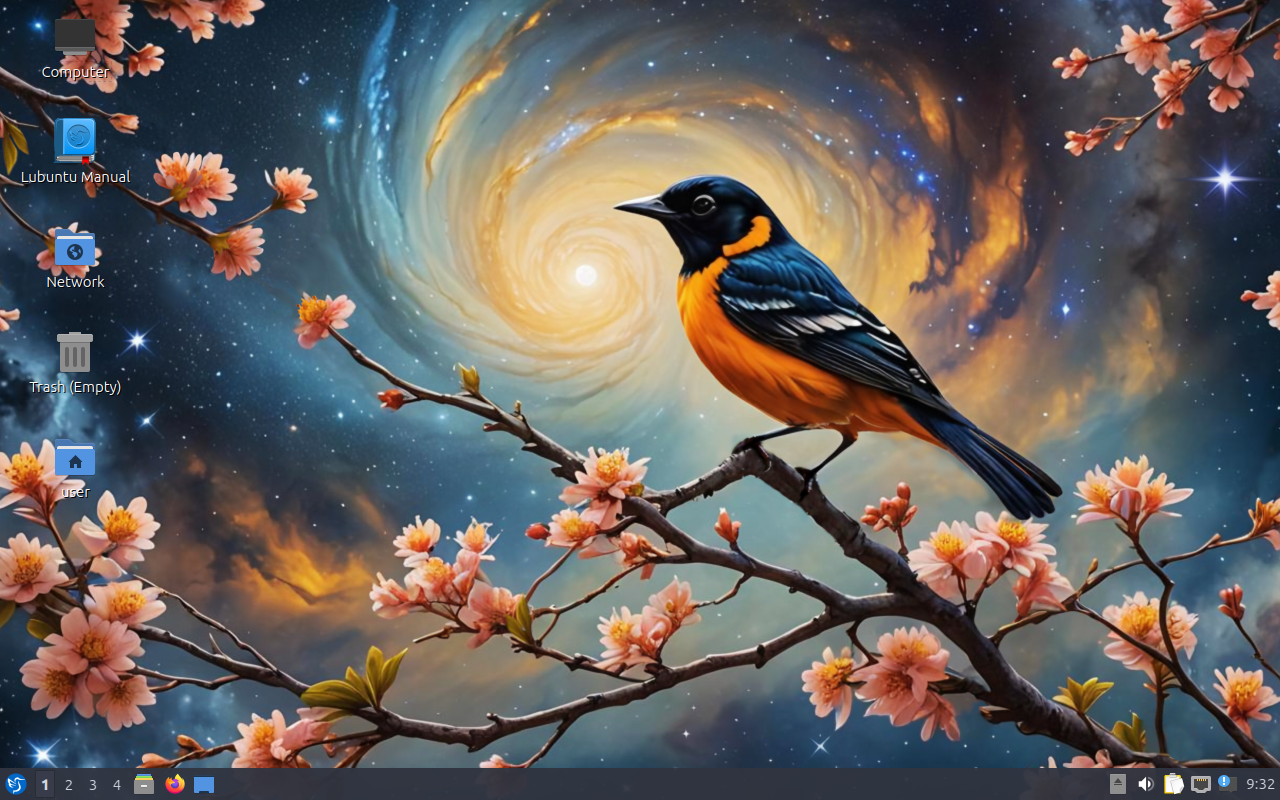
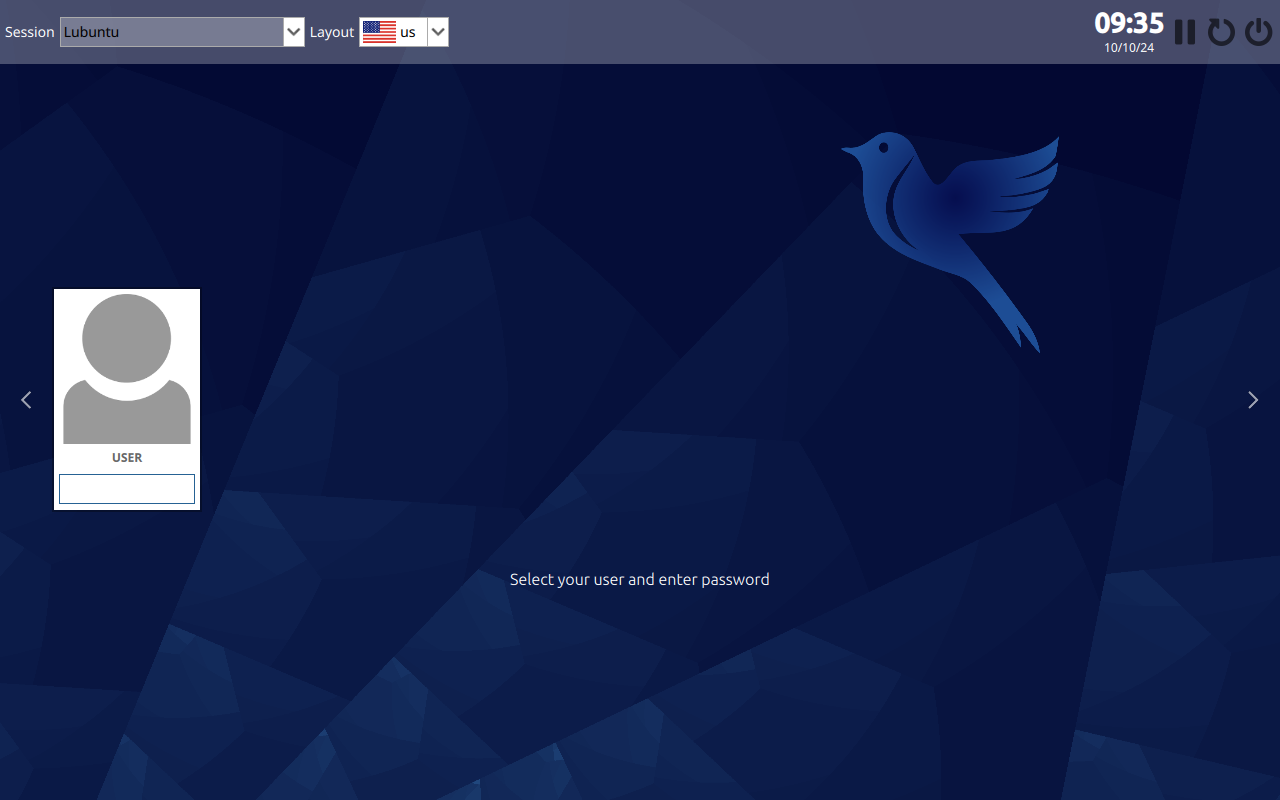
Lubuntu 24.10 ships with a stunning new wallpaper and login screen. A special thank you to our Lubuntu art team for this lovely creation.
Common Release Notes

Please also check the Ubuntu Oracular Oriole [24.10] Release Notes for more common issues and bugs affecting all Ubuntu flavors.

What is Lubuntu?

Lubuntu is an official Ubuntu flavor which uses the Lightweight Qt Desktop Environment (LXQt). The project’s goal is to provide a lightweight yet functional Linux distribution based on a rock-solid Ubuntu base. Lubuntu provides a simple but modern and powerful graphical user interface, and comes with a wide variety of applications so you can browse, email, chat, play, and be productive. You can find the following major applications and toolkits installed by default in this release:
  • LXQt 2.0.0
  • Qt 6.6.2
  • Mozilla Firefox as shipped in the snap package, the version present on the ISO is version 130.0
  • LibreOffice 24.8.1.2
  • VLC 3.0.21
  • Featherpad 1.5.1
  • Discover Software Center 6.1.5
You can find a variety of other applications installed which aim to enhance your experience while staying out of the way of your normal workflow. New features and bugfixes in core Ubuntu components can be found here.

Lubuntu Manual

The Lubuntu Team has been hard at work in polishing the Lubuntu Manual to make it easy for new and experienced users alike to use their system more productively. The manual can be found at manual.lubuntu.me. We want to thank Lyn Perrine for all the hard work she has put into the Lubuntu Manual. Thank you! Versions of the Lubuntu Manual:
Need help quickly? The Lubuntu Manual can be accessed via the “Lubuntu Manual” desktop icon.

Lubuntu Project

How can I help?

We can always use more help! No matter your skill level or your technical experience, there’s something you can help with that can make a huge difference in Lubuntu. Join us on our IRC, Matrix, or Telegram chats and talk to us there. Whether you know another language, have some spare time to help us test Lubuntu, are good at writing documentation, or just want to stay “in the know,” that is the place to be. More information about contributing can be found here. If you want to contribute to Lubuntu but do not feel you have the time or skills, consider buying a t-shirt or donating to Lubuntu. Another great method to get involved is bug reporting. If you notice an issue, please file a bug using the instructions on the Lubuntu Wiki. Don’t want to file a bug? Let us know what the problem is (in detail, enough that we can reproduce it) and we can assist you in filing one or do it ourselves.

Contributors

We would like to thank the following contributors for dedicating their time to Lubuntu this cycle. Thank you!
We would also like to thank the following past members for their dedication to the project. Without you, Lubuntu would not be what it is today. Thank you!

Global Team

The Lubuntu Global Team has been created to foster communities in non-English languages and locales. An up-to-date list of our communities can be found on our Links page, but the existing groups include: Spanish, Portuguese, Russian, Italian, Chinese, German, Japanese, Arabic, and French. If you would like to start a language group, join our development channel and talk with the Global Team. At minimum, you should have a few interested drivers of the community, and at least one administrator that speaks English. We now have multiple languages available in the support section of our Discourse forum.
31 Aug

Lubuntu 24.04.1 LTS is Released!

Thanks to all the hard work from our contributors, Lubuntu 24.04.1 LTS has been released. With the codename Noble Numbat, Lubuntu 24.04 is the 26th release of Lubuntu, the 12th release of Lubuntu with LXQt as the default desktop environment.

Support lifespan

Lubuntu 24.04 LTS will be supported for 3 years until April 2027. Our main focus will be on this and future releases.

What’s The Difference Between Lubuntu 24.04 LTS And This Release?

Lubuntu 24.04.1 is a set of images produced for convenience so that a fresh install of the latest Lubuntu LTS does not require as many updates after install. If you do system updates regularly, you are already running Lubuntu 24.04.1 LTS, and if you install Lubuntu on a system using a Lubuntu 24.04 LTS image and do system updates, that system will also then be running Lubuntu 24.04.1 LTS.

For more information about 24.04 LTS please see our initial release announcement

What is Lubuntu?

Lubuntu is an official Ubuntu flavor which uses the LXQt desktop environment. The project’s goal is to provide a lightweight yet functional Linux distribution based on a rock-solid Ubuntu base. Lubuntu provides a simple, modern and powerful graphical user interface, and comes with a wide variety of applications so you can browse, email, chat, play, and be productive.

You can find the following major applications and toolkits installed by default in this release:

  • LXQt 1.4.0
  • Qt 5.15.13
  • Mozilla Firefox as shipped in the snap package, the version present on the ISO is version 129.0.2.
  • LibreOffice 24.2.5.2
  • VLC 3.0.20
  • Featherpad 1.4.1
  • Discover Software Center 5.27.11

You can find a variety of other applications installed which aim to enhance your experience while staying out of the way of your normal workflow.

Upgrading Lubuntu to 24.04.1 LTS

For more information about upgrading please visit our manual page that describes the process. In addition, more information about upgrading releases in Ubuntu and all the flavors for the 24.04 release, can be found here.

Where can I download it?

You can download Lubuntu 24.04.1 LTS on our downloads page.

Lubuntu Manual

The Lubuntu Team has been hard at work in polishing the Lubuntu Manual to make it easy for new and experienced users alike to use their system more productively. The manual can be found at manual.lubuntu.me. We want to thank Lyn Perrine for all the hard work she has put into the Lubuntu Manual. Thank you! Versions of the Lubuntu Manual:

Need help quickly? The Lubuntu Manual can be accessed via the “Lubuntu Manual” desktop icon.

Lubuntu Project

How can I help?

We can always use more help! No matter your skill level or your technical experience, there’s something you can help with that can make a huge difference in Lubuntu. Join us on our Matrix chat and talk to us there. Whether you know another language, have some spare time to help us test Lubuntu, are good at writing documentation, or just want to stay “in the know,” that is the place to be. More information about contributing can be found here.

If you want to contribute to Lubuntu but do not feel you have the time or skills, consider buying a t-shirt or donating to Lubuntu.

Another great method to get involved is bug reporting. If you notice an issue, please file a bug using the instructions on the Lubuntu Wiki.

Don’t want to file a bug? Let us know what the problem is (in detail, enough that we can reproduce it) and we can assist you in filing one or do it ourselves.

Contributors

We would like to thank the following contributors for dedicating their time to Lubuntu this cycle. Thank you!

Thank you for contributing to the Lubuntu community!

Global Team

The Lubuntu Global Team has been created to foster communities in non-English languages and locales, and includes Hans Möller, Noumeno, and Jyoti Gomes as the initial drivers of the project. An up-to-date list can be found on our Links page, but the existing groups include: Spanish, Portuguese, Russian, Italian, Chinese, German, Japanese, Arabic, and French. If you would like to start a language group, join our development channel and talk with the Global Team. At minimum, you should have a few interested drivers of the community, and at least one administrator that speaks English.

We now have multiple languages available in the support section of our Discourse forum.

Resolved Bugs

Known Bugs

Please check the Ubuntu Release Notes for more common issues and bugs affecting all Ubuntu flavors.

25 Apr

Lubuntu 24.04 LTS Released!

Thanks to the hard work from our contributors, Lubuntu 24.04 LTS has been released. With the codename Noble Numbat, Lubuntu 24.04 is the 26th release of Lubuntu, the 12th release of Lubuntu with LXQt as the default desktop environment.

Download and Support Lifespan

With Lubuntu 24.04 being a long-term support interim release, it will follow the standard LTS support period of three years, and will be supported until April 2027.

You can download Lubuntu 24.04 here. If you would like to upgrade your existing 23.10 installation, please visit our manual page describing the process. Common Ubuntu instructions can be found here.

New in 24.04

Try or Install Screen

Try or Install Screen

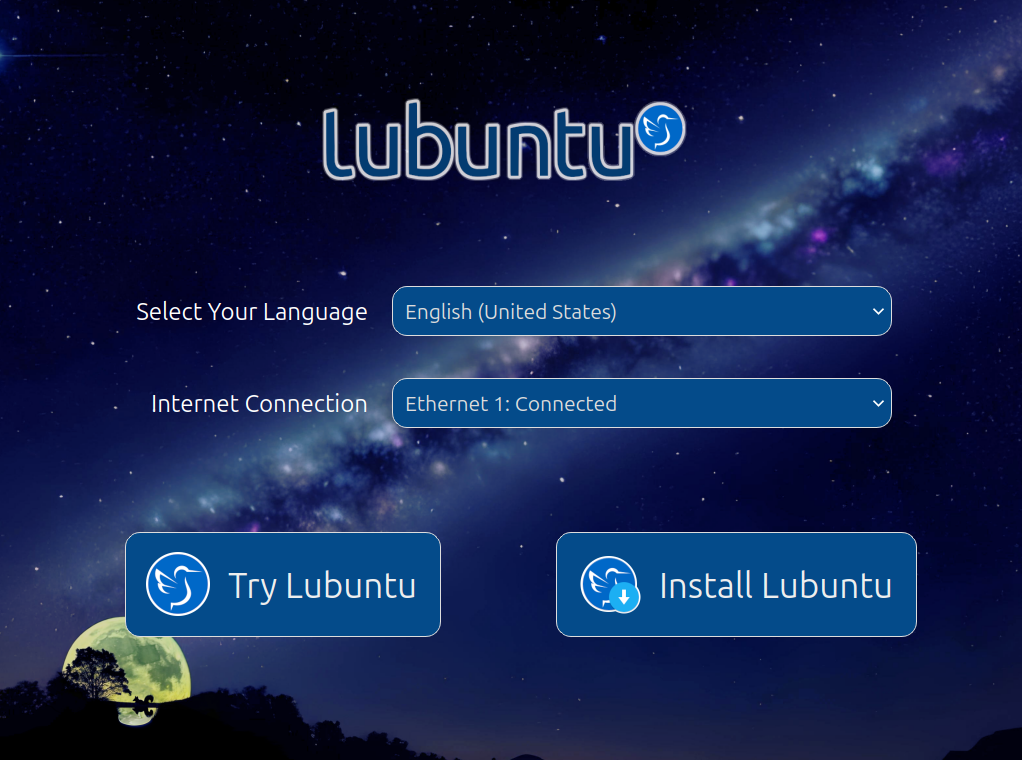
Lubuntu now ships an attractive "installer prompt", which provides a simple, intuitive, and beautiful environment from which to connect to the Internet, set your desired language, and choose to Try or Install Lubuntu. If you select a different language and choose to Try Lubuntu, the live session will automatically be updated for that language.

System Installer

Customize Menu

Customize Menu

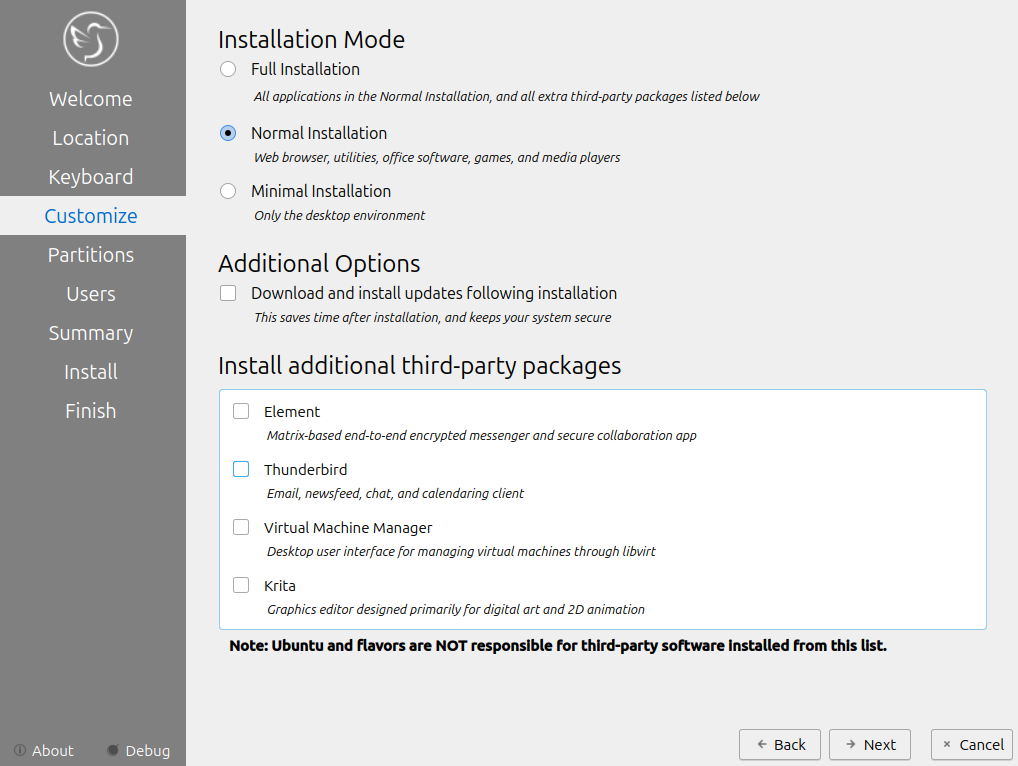
Traditionally, installing Lubuntu only provides a regular installation mode (a single option for installs). This changes with Lubuntu 24.04, where you can now pick between Normal, Full, and Minimal. A Normal installation gives you a traditional Lubuntu experience. The Minimal mode ships with just the desktop environment and essential components (no web browser or snapd). A Full installation is the same as Normal, but comes with several recommended third-party apps:

  • Virtual Machine Manager
  • Element
  • Thunderbird
  • Krita

In addition, you can choose to download and install updates during the installation procedure rather than having to install them afterwards. This can help speed up the installation process and get you up-and-running quicker.

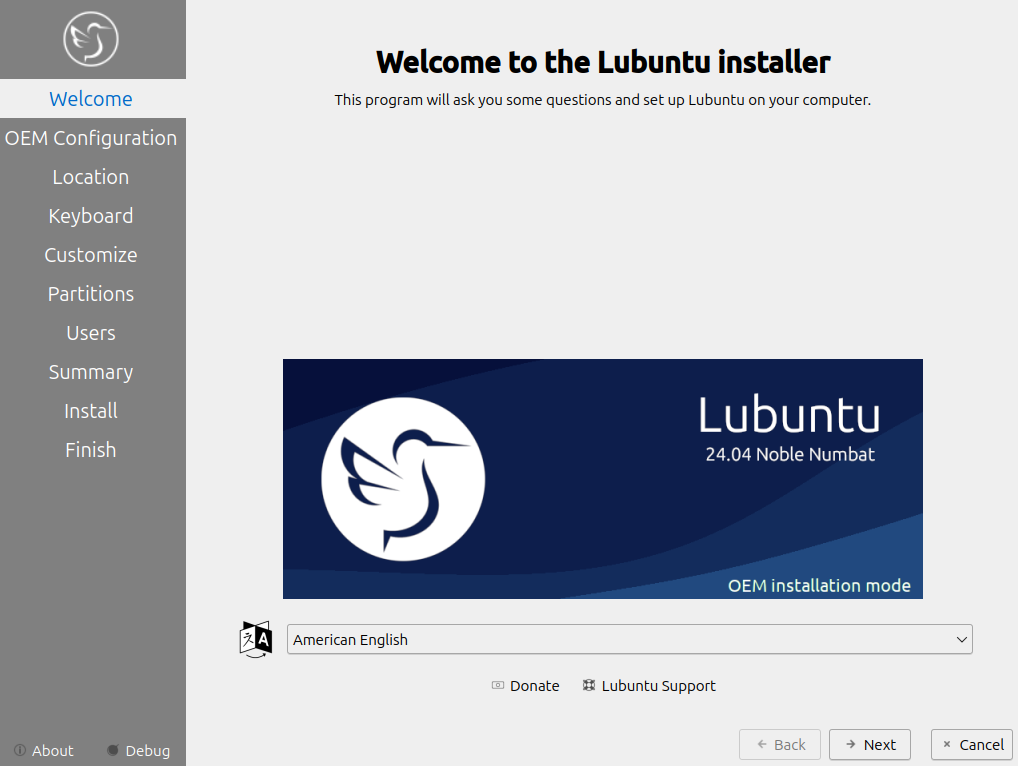
OEM Installation Mode

OEM Installation Mode

Since our transition to LXQt over five years ago, we've been notably missing one very useful feature – an OEM installation mode. In the past, it was possible to install and configure Lubuntu on a system, then prepare it for shipping to an end-user. This is useful for hardware manufacturers or people giving a computer to someone else, but is not functionality we retained.

We are pleased to report that the OEM installer has made a comeback in Lubuntu 24.04.

If you're looking to sell, provision, or donate hardware with Lubuntu preinstalled, the OEM installation mode is meant for you. OEM installation is exactly the same as normal installation, except for the user account created at install time is a temporary OEM user rather than a permanent user. After installation, you can:

  • log in
  • install or remove software
  • run tests
  • configure settings
  • etc.

Once the system is configured properly, you can activate the "Prepare for shipping to end user" icon on the desktop, confirm that you are finished configuring the system, shut the computer down, and then send it to its intended destination. When the user receives it and powers it on, they will be shown a first-boot setup screen allowing them to configure their own user account.

You can activate OEM installation mode by selecting "OEM install (for manufacturers)" in the ISO boot menu. Alternatively, you can boot the ISO normally, click Try Lubuntu, and then launch the OEM installer from the Application Menu > System > Install Lubuntu 24.04 LTS (OEM mode).

Applications and Utilities

It's not often that we add new utilities to Lubuntu, but this cycle we added several new applications to our default install, providing several new and powerful features we think you'll enjoy using.

Bluetooth Management

We now ship Blueman as our Bluetooth manager. This provides a convenient system tray icon for managing bluetooth devices. If your system is Bluetooth-enabled, a status icon will automatically appear in the toolbar.

SDDM Configuration Editor

Have you always wanted to configure the login screen? Good news, you now can! The SDDM configuration editor allows you to modify the login screen settings, changing the theme used, adjusting the reboot and shutdown commands used, and much more.

Software Updater

Our previous software update installer has been replaced by a new-and-improved utility, "Lubuntu Update". The UI has been substantially revamped, update notifications have been integrated into the system better, and you can now manually check for updates and install them whenever you want.

Redshift

If you are one of the many users that benefit from having a night color mode on your system, you'll be happy to hear that Lubuntu now ships a night color feature via Redshift-Qt. You can enable it by running Redshift from the application menu.

Picom Configuration Utility

Lubuntu is the lightest official Ubuntu flavor. That is by design – we try to keep things small, sleek, and clean, rather than big, heavy, and fancy. This commitment to a lightweight experience is most evident in our lack of fancy desktop effects.

What if you actually want some fancy desktop effects?

With the Picom Configuration utility, you can now easily enable window transparency, titlebar transparency, shadows, and fade-in/fade-out effects on your desktop, and more. Note that changes made in this utility will require you to log out and log back in before they take effect.

Artwork

SDDM greeter background

Thanks to the efforts of our team and the work of other open-source artists and designers, we have significantly refreshed the artwork in Lubuntu 24.04:

  • The wallpaper and login screen have been refreshed with images designed specifically for Lubuntu 24.04.
  • The Lubuntu Manual icon has been refreshed.
  • For those who like to customize their desktop, you can install the lxqt-themes-extra package to get two new LXQt themes (win-eleven-dark and sombre-et-rond).

Known Bugs

Installer

  • Calamares installer lacks a way to install proprietary drivers: Bug #1825286
  • lubuntu/xubuntu reinstall (& install) on dual boot system, grub does appear & offer OS choice: Bug #2060624
  • Calamares automatically creates swapfile with manual partitioning without any warning: Bug #2062060
  • missing option to erase and use the whole drive: Bug #2059907
  • Calamares fails to install on logical volume on several conditions when using Manual Partitioning: Bug #2061123

LXQt

  • changing monitor configuration & on next login, only one monitor is fully usable to LXQt: Bug #2013074
  • Keyboard layout is ignored: Bug #2047295
  • The network manager tray application silently fails on incorrect passwords: Bug #1865949

Common Release Notes

Please also check the Ubuntu Release Notes for more common issues and bugs affecting all Ubuntu flavors.

What is Lubuntu?

Lubuntu is an official Ubuntu flavor which uses the Lightweight Qt Desktop Environment (LXQt). The project’s goal is to provide a lightweight yet functional Linux distribution based on a rock-solid Ubuntu base. Lubuntu provides a simple but modern and powerful graphical user interface, and comes with a wide variety of applications so you can browse, email, chat, play, and be productive. You can find the following major applications and toolkits installed by default in this release:

You can find a variety of other applications installed which aim to enhance your experience while staying out of the way of your normal workflow. New features and bugfixes in core Ubuntu components can be found here.

Lubuntu Manual

The Lubuntu Team has been hard at work in polishing the Lubuntu Manual to make it easy for new and experienced users alike to use their system more productively. The manual can be found at manual.lubuntu.me. We want to thank Lyn Perrine for all the hard work she has put into the Lubuntu Manual. Thank you! Versions of the Lubuntu Manual:

Need help quickly? The Lubuntu Manual can be accessed via the “Lubuntu Manual” desktop icon.

Lubuntu Project

How can I help?

We can always use more help! No matter your skill level or your technical experience, there’s something you can help with that can make a huge difference in Lubuntu. Join us on our chat (which is bridged three ways to Matrix, Telegram, and IRC) and talk to us there. Whether you know another language, have some spare time to help us test Lubuntu, are good at writing documentation, or just want to stay “in the know,” that is the place to be. More information about contributing can be found here. If you want to contribute to Lubuntu but do not feel you have the time or skills, consider buying a t-shirt or donating to Lubuntu. Another great method to get involved is bug reporting. If you notice an issue, please file a bug using the instructions on the Lubuntu Wiki. Don’t want to file a bug? Let us know what the problem is (in detail, enough that we can reproduce it) and we can assist you in filing one or do it ourselves.

Contributors

We would like to thank the following contributors for dedicating their time to Lubuntu this cycle. Thank you!

Global Team

The Lubuntu Global Team has been created to foster communities in non-English languages and locales. An up-to-date list of our communities can be found on our Links page, but the existing groups include: Spanish, Portuguese, Russian, Italian, Chinese, German, Japanese, Arabic, and French. If you would like to start a language group, join our development channel and talk with the Global Team. At minimum, you should have a few interested drivers of the community, and at least one administrator that speaks English. We now have multiple languages available in the support section of our Discourse forum.

11 Apr

Lubuntu Noble Beta Released!

We are happy to announce the Beta release for Lubuntu Noble (what will become 24.04 LTS)!

What makes this cycle unique?

Lubuntu is a lightweight flavor of Ubuntu, based on LXQt and built for you. As an official flavor, we benefit from Canonical’s infrastructure and assistance, in addition to the support and enthusiasm from the wider Ubuntu community. We are thankful for the opportunity to call ourselves an Ubuntu flavor; when there are common struggles, we step up to help. When discussions arise that affect the entire ecosystem, we lend a voice. This cycle was no different in that respect, but different in many others.

This started with the normal transitions that occur during the beginning of every cycle, a list of which can be found on the release schedule for Noble. These transitions take time; we (as Ubuntu) perform rigorous testing to ensure these packages are ready before publishing them for general availability. Several feature uploads became stuck, but we were looking forward to the opportunity to test after Feature Freeze.

We then faced two major transitions following Feature Freeze, the first of which was time_t. This allows for 32-bit devices to work past 2038. To learn more about the 2038 problem, visit this site. Immediately following this transition, the xz-utils backdoor was found. We would like to thank the Canonical and community developers involved in these transitions for their work around the clock to get everyone in the ecosystem to a releaseable state.

What does this mean for Lubuntu?

We need extra help from our community to test this release. If you have a few spare hours (or even minutes), please do help us test. If something is not working, please feel free to check the Beta tracking document, and file a bug if it is not otherwise reported.

If you are unsure how to file a bug report but just want to make the issue known, that is okay, please either make a post on our Discourse instance or join our Development channel on Matrix. Any help is appreciated, and your one post or message will make a difference for many users.

What new features made it?

For much more information, please see the Alpha status post.

Since then, we have made the tough decision to not include the following in the final release:

  • Power management UX.
  • Active Directory support in Calamares before release; that pull request has been submitted upstream.

That being said, a redesigned Customize menu has made it, in addition to other bugfixes and features listed in the Alpha announcement.

Our final release announcement will have many more details, stay tuned!

Where do I download it?

From our downloads page, here.

22 Feb

Lubuntu 22.04.4 LTS is Released!

Thanks to all the hard work from our contributors, Lubuntu 22.04.4 LTS has been released. With the codename Jammy Jellyfish, Lubuntu 22.04 is the 22nd release of Lubuntu, the eighth release of Lubuntu with LXQt as the default desktop environment.

Support lifespan

Lubuntu 22.04 LTS will be supported for 3 years until April 2025. Our main focus will be on this and future releases.

What’s The Difference Between Lubuntu 22.04 LTS And This Release?

Lubuntu 22.04.4 is a set of images produced for convenience so that a fresh install of the latest Lubuntu LTS does not require as many updates after install. If you do system updates regularly, you are already running Lubuntu 22.04.4 LTS, and if you install Lubuntu on a system using a Lubuntu 22.04 LTS image and do system updates, that system will also then be running Lubuntu 22.04.4 LTS.

This Lubuntu 22.04.4 media also contains the updated HWE 6.5 kernel stack (from Lubuntu 23.10). This enables newer hardware to function more smoothly. Prior 22.04 22.04 media contained only the 5.15 GA kernel stack or now-outdated HWE kernel stacks.

What is Lubuntu?

Lubuntu is an official Ubuntu flavor which uses the LXQt desktop environment. The project’s goal is to provide a lightweight yet functional Linux distribution based on a rock-solid Ubuntu base. Lubuntu provides a simple, modern and powerful graphical user interface, and comes with a wide variety of applications so you can browse, email, chat, play, and be productive.

You can find the following major applications and toolkits installed by default in this release:

  • LXQt 0.17.0 – more information here.
  • Qt 5.15.3
  • Mozilla Firefox will be shipped as a Snap package with version 122 and will receive updates throughout the support cycle of the release.
  • The LibreOffice 7.3.7 suite.
  • VLC 3.0.16, for viewing media and listening to music.
  • Featherpad 1.0.1, for notes and code editing.
  • Discover Software Center 5.24.7, for an easy, graphical way to install and update software.

You can find a variety of other applications installed which aim to enhance your experience while staying out of the way of your normal workflow.

Please note: The change of firefox to snap package, results in the browser being slower to start. It does not impact execution or subsequent runs during that session. The reason for this is because setting up the confined environment in which snaps run takes time. This is noticeable on first run especially with live media having improved significantly when compared to prior Lubuntu 22.04 LTS media. The confined environment provides significant security and privacy benefits.

If you’d like to use LXQt 1.4 on your existing, or new Lubuntu 22.04.4 LTS install, then please see how to upgrade it with the use of the Lubuntu Backports PPA.

Upgrading Lubuntu to 22.04 LTS

Notice about upgrading from Lubuntu 20.04 LTS with LXQt

If you are upgrading from Lubuntu 20.04 LTS that has LXQt, this new version uses a different Openbox settings configuration file. If you have customized ~/.config/openbox/lxqt-rc.xml you will want to copy that file to ~/.config/openbox/rc.xml. New installations are not impacted by this change.

New installs of Lubuntu 22.04 LTS no longer include the programs trojita, fcitx and k3b, which will cause those applications to be removed from your existing system on upgrade, unless you mark them as manually installed using the procedure we’ve documented here. You should do this for each of the programs you use, before you perform the upgrade.

For more information about upgrading please visit our manual page that describes the process. In addition, more information about upgrading releases in Ubuntu and all the flavors for the 22.04 release, can be found here.

Where can I download it?

You can download Lubuntu 22.04.4 LTS on our downloads page.

Installer

Lubuntu uses the Calamares system installer in place of the Ubiquity installer that most other flavors use. 22.04 ships with Calamares 3.2.61. For a full/erase disk install, we have added the option of a swapfile by default. The swapfile size is initially set to 512 MB. The option for no swap is still available as a dropdown selection.

For a full description of the new features and fixes, see the upstream announcements for 3.2.61.

Lubuntu Manual

The Lubuntu Team has been hard at work in polishing the Lubuntu Manual to make it easy for new and experienced users alike to use their system more productively. The book can be found at manual.lubuntu.me.

We want to thank Lyn Perrine for all the hard work she has put into the Lubuntu Manual. Thank you!

All existing URLs now redirect to https://manual.lubuntu.me/stable/. Going forward, the tip of the master branch (WIP documentation for the next release) can be found at https://manual.lubuntu.me/master/, and documentation for Lubuntu 22.04 LTS can be found at https://manual.lubuntu.me/lts/. While the documentation for previous releases will be kept in the Git repository, they will not be published anywhere.

Lubuntu Project

How can I help?

We can always use more help! No matter your skill level or your technical experience, there’s something you can help with that can make a huge difference in Lubuntu. Join us on any of our chat platforms (preferably Matrix) and talk to us there. Whether you know another language, have some spare time to help us test Lubuntu, are good at writing documentation, or just want to stay “in the know,” that is the place to be. More information about contributing can be found here.

If you want to contribute to Lubuntu but do not feel you have the time or skills, consider buying a t-shirt or donating to Lubuntu.

Another great method to get involved is bug reporting. If you notice an issue, please file a bug using the instructions on the Lubuntu Wiki.

Don’t want to file a bug? Let us know what the problem is (in detail, enough that we can reproduce it) and we can assist you in filing one or do it ourselves.

Contributors

We would like to thank the following contributors for dedicating their time to Lubuntu this cycle. Thank you!

In addition, we would also like to recognize some very active contributors on our Discourse forum.

Thank you for contributing to the Lubuntu community!

Global Team

The Lubuntu Global Team has been created to foster communities in non-English languages and locales, and includes Hans Möller, Noumeno, and Jyoti Gomes as the initial drivers of the project. An up-to-date list can be found on our Links page, but the existing groups include: Spanish, Portuguese, Russian, Italian, Chinese, German, Japanese, Arabic, and French. If you would like to start a language group, join our development channel and talk with the Global Team. At minimum, you should have a few interested drivers of the community, and at least one administrator that speaks English.

We now have multiple languages available in the support section of our Discourse forum.
Resolved Bugs

The original Lubuntu 22.04 LTS media when used to install with a btrfs file-system usually resulted in an unbootable system due to this bug. This did not affect upgraded systems, impacting only new installs using BTRFS file-systems and 22.04 media; this issue will not impact new installs of Lubuntu 22.04.4 LTS.

The lubuntu-update-notifier did not prompt users when configuration files conflicted with installed versions. In addition, if lubuntu-update-notifier was interrupted during an upgrade there was no mechanism to handle that. Further information can be found on our Discourse post.

Libreoffice online help was previously not usable due to a confinement issue with the firefox snap, snapd, and this issue. This has now been resolved.

Known Bugs

Please check the Ubuntu Release Notes for more common issues and bugs affecting all Ubuntu flavors.

25 Jan

Lubuntu 23.04 Reaches End-of-Life – Upgrade to 23.10 Now

Lubuntu 23.04 has reached end-of-life as of today, January 25, 2024. It will no longer receive software updates (including security fixes) or technical support. All users are urged to upgrade to Lubuntu 23.10 as soon as possible to stay secure. You can upgrade to Lubuntu 23.10 without reinstalling Lubuntu from scratch by following the official upgrade procedure. Alternatively, you can download Lubuntu 23.10 or Lubuntu 22.04 and do a clean installation if you prefer.

Nine months ago, on April 20th, 2023, Lubuntu 23.04 was released. It shipped a number of new features including an enabled-by-default X compositor (Picom), PipeWire, a new default screensaver, and the latest (at the time) version of LXQt. While the innovation and stability Lubuntu 23.04 provided served us well, it is now time to move on. We are now focusing our support efforts on Lubuntu 23.10 and later, as well as on Lubuntu 22.04 LTS. Lubuntu 23.04 will no longer receive bug or security fixes from the Lubuntu team. Additionally, as the underlying Ubuntu 23.04 packages Lubuntu uses have reached end-of-life, Lubuntu 23.04 will no longer receive updates for any core applications, utilities, or OS components.

Lubuntu features two different types of releases – Long Term Support (LTS) releases and interim releases. Interim releases are supported for only nine months after release, and are primarily for users who are willing or able to upgrade or reinstall frequently in order to get the best that Lubuntu has to offer. Lubuntu 23.04 was an interim release, and is being dropped from Lubuntu support accordingly.

Note that users of Lubuntu 22.04 LTS do not have to take any action at this time. LTS releases are supported for three years from the date of release. We will continue to support Lubuntu 22.04 LTS until April 2025.

If you are still running Lubuntu 23.04, we strongly recommend that you upgrade to Lubuntu 23.10 as soon as possible. You can read about what’s new in Lubuntu 23.10 here. Alternatively, if you are unable to use Lubuntu 23.10, or if you would like to use our LTS releases and avoid frequent upgrades, you can install Lubuntu 22.04 from scratch and enjoy another year of updates and support before having to upgrade again.

Thank you to everyone who uses Lubuntu! If you have problems reinstalling or upgrading, feel free to ask for help via our official support channels. We’re happy to help users having upgrade problems even after Lubuntu 23.04’s end-of-life date. You can find a list of places to reach us by visiting our Links page. We can also be reached via IRC at #lubuntu on Libera.Chat.